First, the ambiguity. If you searched for the best AI model generator hoping for a machine-learning model, this is the wrong article. The model here is the one in the photograph: the person wearing the jacket, holding the bottle, walking the look. No casting call, no studio, no shoot day.
There are now plenty of tools that do this, and the differences only show up when you try to shoot a whole catalogue instead of one nice image. So this guide starts with how to choose, then looks at seven tools and what each one says it is for.
What an AI model generator actually does
You give it a product. It gives you a person wearing or holding that product, in a setting you chose.
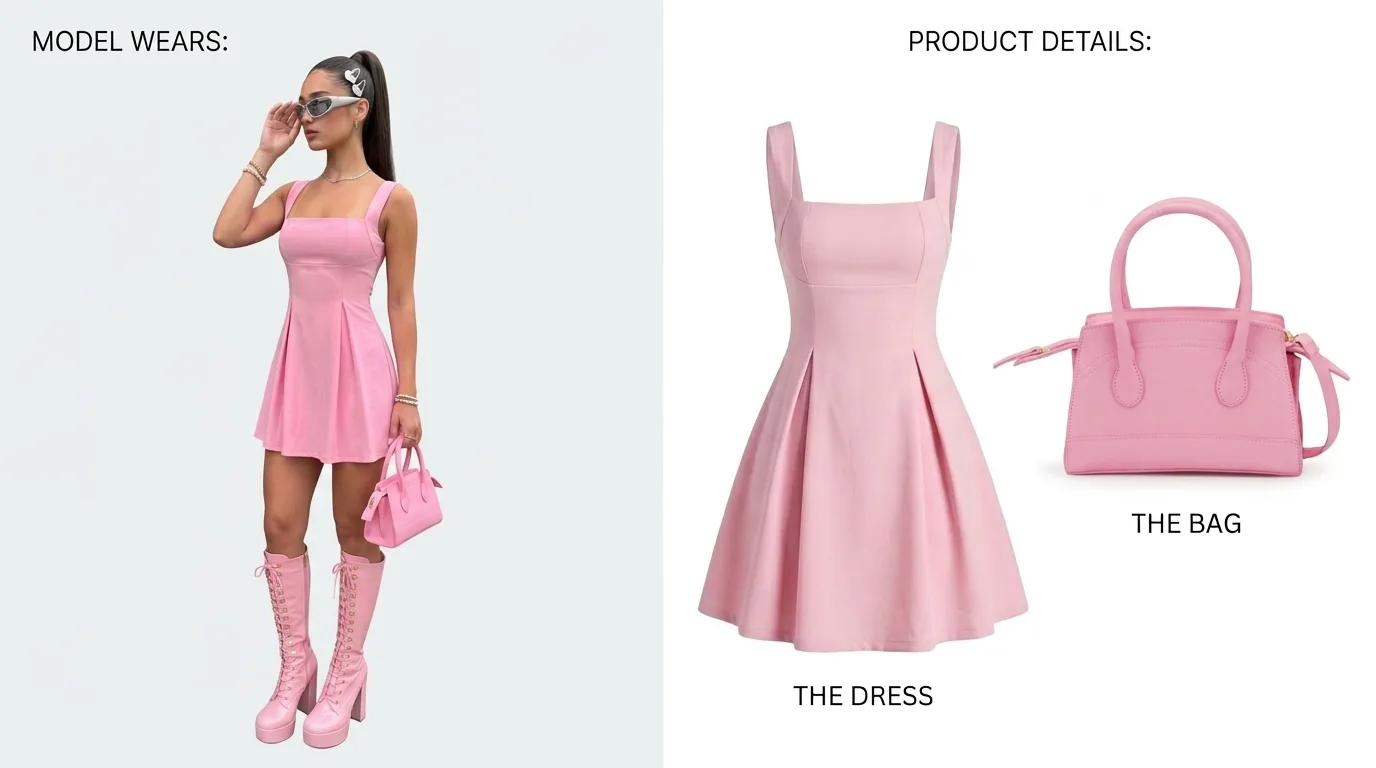
The input is usually a photo you already have: a flat lay, a mannequin shot, a packshot. The output is an on-model image, and increasingly a short video. Everything in between is where the tools differ: who the model is, whether she is the same person tomorrow, and how faithfully your garment survives the trip.
One image is easy. Almost any tool can produce a single good frame. The job is the other two hundred.
How to choose the best AI model generator for fashion
Four tests, in the order they tend to go wrong.
Garment fidelity. The model is invented. The product must not be. A print that moves, a collar that changes shape or a colour that drifts a shade is not a creative choice, it is a returns problem. Test with your most awkward piece: the one with the small repeat print, the unusual construction or the logo on the chest. Compare the output to the sample at full zoom, not at thumbnail size.
Consistency. A season needs one face from the first look to the last. Ask whether the tool can save a model and bring the same person back next month, and whether the light and the crop hold when the garment changes. A collection page where every tile has a different stranger on it reads as a stock library.
Rights. Find the sentence that says you can use the images commercially, and find out which plan it applies to. Then find the sentence about what happens to your uploads. If you cannot locate either on the site, ask before you build a catalogue on it.
Video. Product pages and paid social both want motion now. Check whether video comes from the same model as the stills, or from a separate tool that gives you a different person.
Two smaller questions are worth a minute each. Does it cover the bodies and skin tones you actually sell to? And does it fit how your team works: files you download, a store app, or an API?
What changes for ecommerce
Fashion is about the garment on a body. Ecommerce is wider. It includes the product in a hand, on a shelf, in a scene, and across every variant on the listing.
Scale is the hardest thing to read on a product page, so check how a tool handles things that are held rather than worn. Check variants too. If the swatch says green, the image should show the green one.
And check the boring part: how finished files reach your store. Some tools publish to a storefront directly. Others hand you files that upload like camera files do. Neither is wrong, but one of them will suit your workflow better than the other.
We cover both sides in more depth on the AI fashion model generator page and the AI product photography for ecommerce page.
Seven AI model generators, and what each is built for
What follows is what each company says on its own site, at the time of writing. We have not benchmarked them against each other, and we are not quoting prices, because prices change. Pricing is on each site.
Famebase
Ours, so weigh this accordingly. The Famebase AI model generator is built around a trained identity. There are two ways to get a model: buy a 1-of-1 from the Marketplace, which arrives trained, or upload a model you already have and train her on Famebase. Either way, the same model runs every frame that follows: lookbook, catalogue angles, product in hand, video. Famebase does not invent a new face for you; the point is that the face you own stays the same.
Commercial usage rights are included on every plan. Product placement and outfit swaps, which are how your own garment gets onto the model, are Pro plan features. There is no store app to install. Famebase hands you finished images and video, and you upload them wherever they need to go.
Where it fits best: a brand that wants a house model it keeps, and wants her to show up in the feed as well as on the product page. Where it fits less well: a team that wants a storefront plugin. See pricing for what each plan includes.
Photoroom
Photoroom has an AI fashion model tool. Its site describes uploading a clothing photo, including flat lays, choosing a virtual model, a pose and a background, and saving custom models to a Brand Kit for reuse. It also offers an API.
Botika
Botika is aimed at fashion brands. Its site lists on-model, flat lay and mannequin photography as starting points, plus AI fashion video, and talks about consistency and quality at scale.
The New Black
The New Black offers an AI fashion model generator. Its AI model page describes turning flat lay or mannequin shots into on-model images, choosing the model by fields such as gender, age, origin and body shape, and keeping a consistent model across a collection. It also lists video workflows, and says paid plans carry commercial rights to what you generate.
Modelia
Modelia describes turning flat apparel images into model photos for ecommerce and marketing, with model attributes you select and a tool for consistent characters. Its site mentions image-to-video, a Shopify app and API access. It also states that your uploads and generations are not used to train models.
Uwear
Uwear positions itself at the enterprise end. Its site describes turning product assets such as flat lays and ghost mannequin shots into photos and video, with a locked art direction, saved AI models and automatic quality review on every image. It offers integration with the systems a larger retailer already runs.
WeShop AI
WeShop AI offers an AI model tool for sellers. Its site describes uploading a flat lay, mannequin or product-only garment image, then choosing the model, pose, background and body type, and generating several poses from one image while keeping the outfit.
Which one should you pick?
Work backwards from the deliverable.
If you need a plugin that writes images straight into a storefront, shortlist the tools that say they have one. If you are a large retailer wiring imagery into existing systems, shortlist the ones with an API and a review step. If your team already uses one of these tools, start there.
If you want one model who belongs to your brand, carries the season, and can also post, that is the job Famebase is built for. It is also the difference between a model and a persona. A model fills a shot. A persona fills a feed. If the second one is what you are really after, read what is an AI influencer? or go to the AI influencer generator.
Whichever way you lean, run the same test on every shortlisted tool. Take your three most difficult products. Shoot each one front, back and three-quarter on the same model. Then add a video cut. Put the results next to the real samples and look at the prints, the seams and the face.
The tool that wins that test is the best one. For your catalogue, anyway, which is the only one that counts.
Questions, answered
What is an AI model generator?
An AI model generator produces the person in a photograph, the model wearing the garment or holding the product, without a casting call, a studio or a shoot day. It is not a tool for building machine-learning models.
Which is the best AI model generator for clothing brands?
The one that keeps your garment accurate and your model consistent across a whole collection. Test each shortlisted tool with your most difficult pieces and compare the results with the real samples at full zoom.
Can I use AI model photos commercially?
It depends on the tool and the plan, so read the terms before you publish. On Famebase, commercial usage rights are included on every plan.
Can an AI model generator make video as well as photos?
Several can, according to their own sites. Check that the video uses the same model as your stills, so the clip and the photograph look like one person.